 |
Kobo Libra vs ONYX BOOX Leaf
Last updated: July 20, 2023
Kobo Libra and ONYX BOOX Leaf are two feature-rich e-book readers designed to provide a comfortable and immersive reading experience, but they have distinct differences that cater to different reading preferences.
1. Display Size and Resolution: One of the primary differences between Kobo Libra and ONYX BOOX Leaf lies in their display size and resolution. Kobo Libra features a 7-inch E Ink Carta HD touchscreen display, providing a spacious reading area with sharp text and excellent contrast. The larger screen size makes it suitable for users who enjoy reading larger-format documents like PDFs and comics. It offers a resolution of 1680 x 1264 pixels, providing a crisp and clear reading experience. On the other hand, ONYX BOOX Leaf boasts a 6-inch E Ink Carta HD display, which is a standard size for most e-book readers. It also offers a resolution of 1448 x 1072 pixels, delivering a high-quality reading experience, though with a slightly smaller screen compared to Kobo Libra.
2. Front Lighting and Design: Both Kobo Libra and ONYX BOOX Leaf come with built-in front lighting, allowing users to read in various lighting conditions. However, the specific front lighting technology and design may differ. Kobo Libra typically features Kobo's ComfortLight Pro, which provides an adaptive front light that automatically adjusts based on ambient lighting conditions for a more comfortable reading experience. ONYX BOOX Leaf also provides front lighting, but the specific technology and adjustability might vary based on the model. Additionally, Kobo Libra sports an ergonomic design with physical page-turn buttons, offering a comfortable grip for one-handed reading. In contrast, ONYX BOOX Leaf has a more minimalist design with a sleek and modern appearance.
3. Ecosystem and Content: Another significant difference is in their ecosystems and content offerings. Kobo Libra is part of the Kobo ecosystem, which offers access to a wide selection of e-books, audiobooks, and magazines through the Kobo Store. Kobo users can also benefit from services like Kobo Plus, which provides unlimited access to a library of e-books for a monthly fee. On the other hand, ONYX BOOX Leaf does not have a dedicated content ecosystem but allows users to access various e-book sources and install third-party apps through its Android-based platform. This versatility provides more freedom for users who prefer to source their e-books from different bookstores or platforms.
1. Display Size and Resolution: One of the primary differences between Kobo Libra and ONYX BOOX Leaf lies in their display size and resolution. Kobo Libra features a 7-inch E Ink Carta HD touchscreen display, providing a spacious reading area with sharp text and excellent contrast. The larger screen size makes it suitable for users who enjoy reading larger-format documents like PDFs and comics. It offers a resolution of 1680 x 1264 pixels, providing a crisp and clear reading experience. On the other hand, ONYX BOOX Leaf boasts a 6-inch E Ink Carta HD display, which is a standard size for most e-book readers. It also offers a resolution of 1448 x 1072 pixels, delivering a high-quality reading experience, though with a slightly smaller screen compared to Kobo Libra.
2. Front Lighting and Design: Both Kobo Libra and ONYX BOOX Leaf come with built-in front lighting, allowing users to read in various lighting conditions. However, the specific front lighting technology and design may differ. Kobo Libra typically features Kobo's ComfortLight Pro, which provides an adaptive front light that automatically adjusts based on ambient lighting conditions for a more comfortable reading experience. ONYX BOOX Leaf also provides front lighting, but the specific technology and adjustability might vary based on the model. Additionally, Kobo Libra sports an ergonomic design with physical page-turn buttons, offering a comfortable grip for one-handed reading. In contrast, ONYX BOOX Leaf has a more minimalist design with a sleek and modern appearance.
3. Ecosystem and Content: Another significant difference is in their ecosystems and content offerings. Kobo Libra is part of the Kobo ecosystem, which offers access to a wide selection of e-books, audiobooks, and magazines through the Kobo Store. Kobo users can also benefit from services like Kobo Plus, which provides unlimited access to a library of e-books for a monthly fee. On the other hand, ONYX BOOX Leaf does not have a dedicated content ecosystem but allows users to access various e-book sources and install third-party apps through its Android-based platform. This versatility provides more freedom for users who prefer to source their e-books from different bookstores or platforms.
26
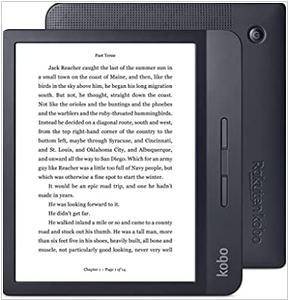
Kobo Libra is the embodiment of your reading style. With more storage, a faster E Ink screen, and Bluetooth wireless technology so you can listen to Kobo Audiobooks, Kobo Libra is an integral part of your rich reading life. Packed with features and personality and storage for all of your eBooks Kobo Libra was made to do more. An ergonomic design keeps your reading life on hand and page turn buttons keep the story going while you sip your coffee, stir your signature pasta sauce, or nurse your newborn so you can read on and on, no matter what.
9
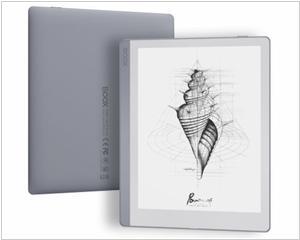
The ONYX BOOX Leaf is an e-book E reader with an enlarged screen and advanced technical characteristics. Thanks to the enlarged screen, this model allows you to combine reading fiction and technical literature. Its high-performance hardware platform ensures a convenient speed of the device even with the most complex documents. The model is based on the Android, which allows you to install and use various third-party apps and significantly expands the capabilities of the device. A built-in Wi-Fi module allows you to use various network services, and Bluetooth allows you to connect external devices. The book is made in a thin compact case, and its screen is covered with Asahi protective glass.
Kobo Libra vs ONYX BOOX Leaf in our news:
2023. Rakuten unveiled Kobo Libra 2
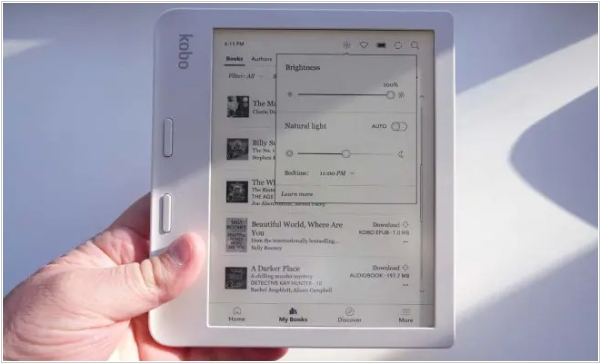
Rakuten Kobo has unveiled the Kobo Libra 2, featuring a 7-inch HD E Ink Carta 1200 touchscreen display with a resolution of 1264 × 1680 pixels or 300 PPI. This e-reader offers color temperature adjustment and Dark Mode, allowing users to customize their reading experience. Powered by a 1 GHz Processor and equipped with 32 GB of onboard storage, the Libra 2 has a distinctive asymmetrical design, with a thicker right spine housing physical page turn buttons. Additionally, it boasts a fully waterproof construction and is available in Black and White variants. Customers can also purchase optional SleepCovers for $50. The Kobo Libra 2 is priced at $250 and is accessible for purchase through Flipkart and various online retailers in India.
2022. Onyx Boox Leaf 2 gets Android 11 and bigger battery
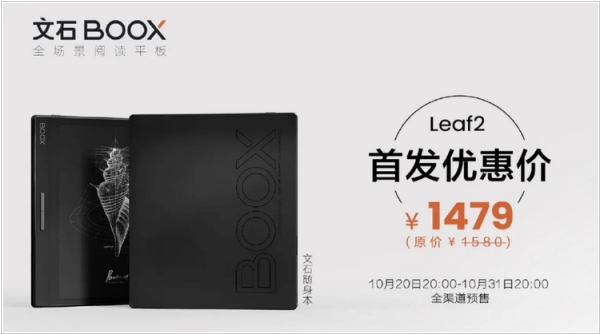
Onyx Boox has unveiled the Leaf2, a 7-inch E Ink reader equipped with a Carta 1200 panel boasting a resolution of 1680 x 1264 and a pixel density of 300 PPI. This e-reader offers a generous 2 GB of memory and 64 GB of internal storage, making it one of the highest in its category. Furthermore, users have the option to expand the storage capacity by up to an additional 512 GB through external means. The Leaf2 is powered by a 2.0 GHz Qualcomm processor, and its operation is sustained by a 2000 mAh battery, ensuring several days of usage before requiring a recharge. Running on Android 11, the device supports 2.4G Wi-Fi and 5G connectivity. Additional features include a USB Type-C interface, an integrated microphone, and support for single speaker audio output. Weighing a mere 180 grams, the Leaf2 is exceptionally lightweight and easy to handle. It also includes a set of buttons that serve the functions of Power and Page Turn. The e-reader is competitively priced at $205.
2021. Onyx Boox launches an affordable Leaf eReader
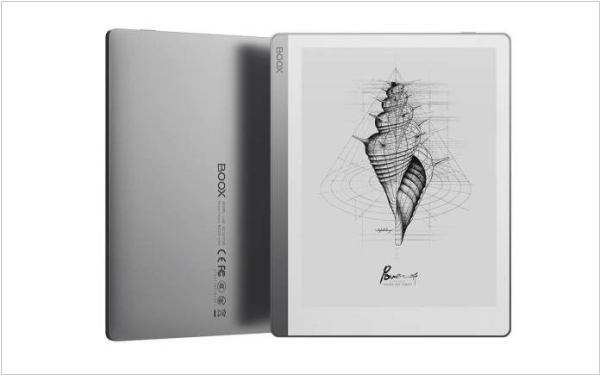
While not widely recognized, Onyx consistently delivers reliable gadgets at a reasonable price point. Their latest offering is the Onyx Boox Leaf, a 7-inch e-book reader that focuses on simplicity and functionality. With no stylus support, it serves as a lightweight alternative, weighing only 170 grams, catering to those seeking a less burdensome device than traditional tablets. The primary emphasis is on reading, providing a distraction-free experience. Onyx also offers a magnetic case specifically designed for the Leaf, enabling users to hold the device like a physical book and utilize the page turn buttons for an authentic reading experience. Additionally, the Leef ebook reader supports audiobooks, text-to-speech functionality, and audiobooks. It is equipped with Bluetooth connectivity, allowing users to enhance their audio listening experience with headphones or Bluetooth speakers. Powered by Android 10, the Onyx Boox Leaf eReader combines simplicity and functionality in a compact package.
2019. Kobo brings the Forma form factor to a cheaper model Kobo Libra
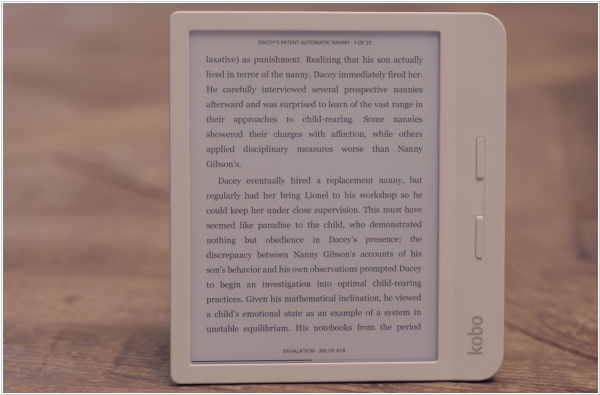
The new Kobo Libra H2O brings the sleek form factor of the Forma e-reader to a 7-inch screen device, retailing at a relatively affordable price of $170. Although it may not be the cheapest option in the e-reader market, it's a positive development to witness some of these advanced features becoming more accessible. The device's form factor is highly functional, allowing users to read in both landscape and portrait orientations, with automatic screen rotation thanks to the built-in accelerometer. Kobo has also made software improvements, enhancing menus, book scrubbing, and previews for a smoother reading experience. Additional convenient features include the ability to adjust front light intensity by swiping the screen's side and the device being waterproofed with an IPX8 rating, ensuring protection against water damage.